The Personal OS I run every day.
Now yours to install.
The workspace, skills, and setup I use to run my own work with AI. Install it in one session, then make it your own.
Personal OS · $374 · Core workspace + Creator Pack · Available now
I bet you're not new to this.
You already use AI. You've set up projects, written instructions, saved context, built a few skills. You've tried ChatGPT, Claude, Gemini, Grok, and probably a few others. Some of the models were good enough to keep using. So were some of the ways you set them up.
The problem is that everything was added one piece at a time. One setup for writing. Another for email. A folder of prompts. Instructions you forgot you wrote. Three versions of the same thing because a new tool looked better that week.
Then you open Claude or Codex and get a workspace, files, tools, and agents. You can build almost anything. Which sounds great until you have to decide what the system should actually be.
The hard part is deciding what belongs, where it goes, and how the pieces should work together.
You need two things.
A starting point that already works.
The freedom to change it without rebuilding everything whenever your work changes.
Personal OS gives you both. You install my setup, then make it your own.
*Email literally received at 8:48 a.m.
“O M G — I've made more progress already today than in the last month. Personal OS is fixing all the issues I have while working with my other installed OS systems. And it's not even 9 am.”
Why I built Personal OS
This is a systems world now.
A personal note on the potential I see in AI, what today's harnesses are still missing, and why I built Personal OS now.
Playing without sound. Use the player controls to unmute.
Personal OS is the install kit.
It's not just a prompt pack or a folder of skills. It's a workspace you install on your own computer, inside Claude Code or Codex, with the files, instructions, and setup that make everything work together.
Here's what's in the bundle.
The workspace template
The exact folder structure I use: inputs, knowledge, skills, and a tracker. My data is removed. The files are plain text, so you own them and can move them to another tool or model later.
Guided setup
When you open Personal OS for the first time, it asks a handful of questions about your work—what you do, who you serve, what you sound like, and what you're working on. Then it fills in the starting files with those answers.
Two install paths — pick yours
Claude Code
Run it in the Claude app or the terminal. I use the app personally.
Codex (ChatGPT)
Run it in the ChatGPT app. Pick this path if ChatGPT is where you have the bigger subscription.
The walkthrough
A recording of me using Personal OS for a full pass through my own work: inbox, tracker, OS Tune, and a content draft. You can see how the pieces work together before setting up yours.
On-demand lessons
Short lessons covering installation, setup, your first useful output, making your first skill, and how harnesses and skills fit together. I'll add more as I record them.
That's the install kit. The skills are next. You install it once. You own it forever.
Real work with Personal OS
I gave Personal OS a rough description of a productized service a consultant might offer. It built the system behind this report.
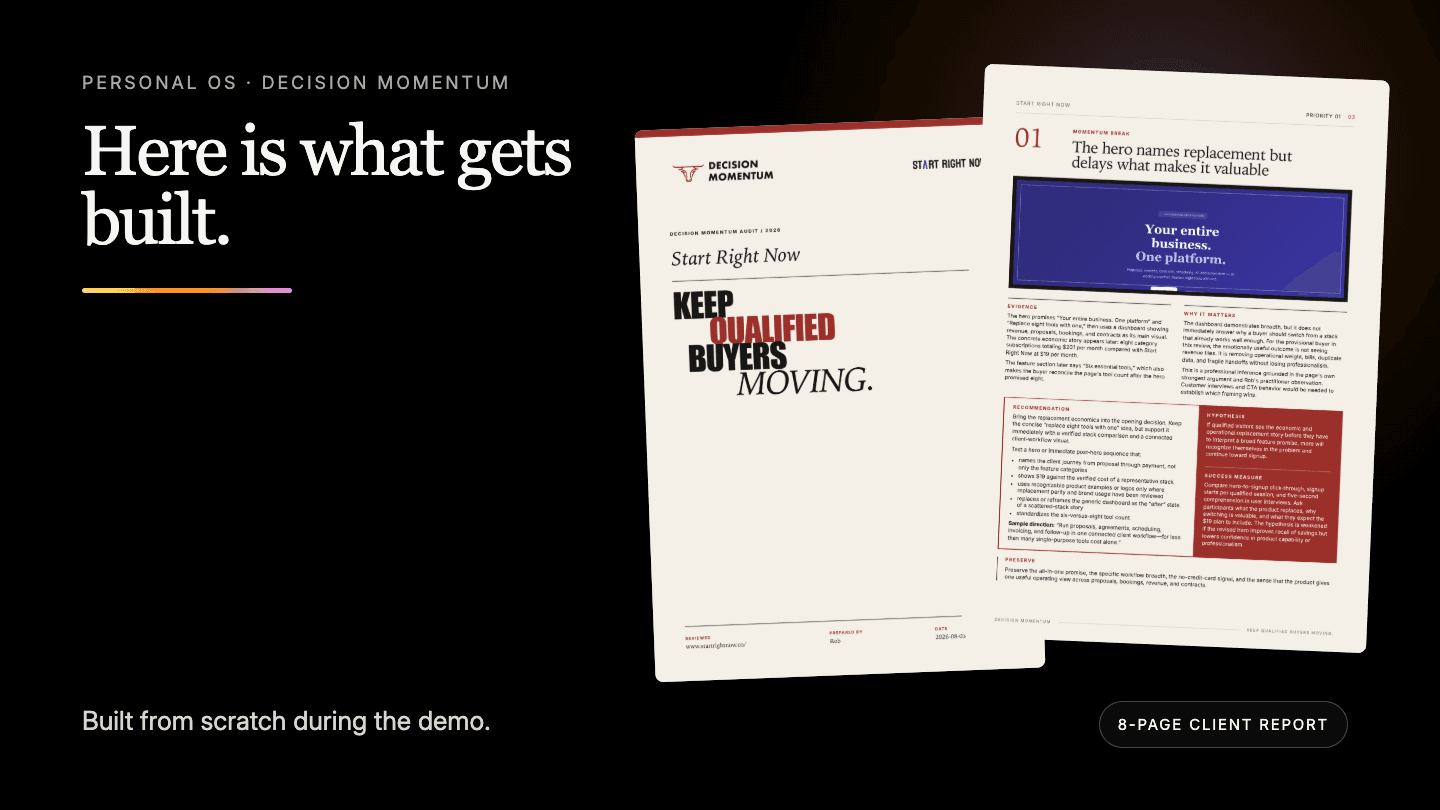
I didn't write a giant prompt or carefully map the workflow first. I just used the skills and the system.
The project was to think about a productized service. In this case, a conversion rate optimization report for a website that a CRO consultant might offer.
I described how I think through optimizing a site. What I'm looking for, the questions I ask, and what I'd want a client to walk away with.
First, OS Skillify: Personal OS turned that into a reusable skill. Then Personal OS ran the skill against a real website, gathered the evidence, and produced an eight-page client deliverable.
Then the more important thing happened: OS Fresh Eyes, a second skill, challenged the work, caught some issues, and Personal OS carried the corrections back into the reusable system.
It ingested my (fake) branding and used it to build a design system and a PDF generator—the whole thing.
What happened during the build
- 1
I spent 5 minutes explaining how I would do the task
A rough explanation of how I approach the work. A brain dump, not a finished workflow.
- 2
Personal OS built the machinery
A reusable skill, supporting references, research steps, and a report structure, all based on proven prompting and skill-writing methods I've perfected over the last few years.
- 3
It did real work
The system analyzed an actual website and captured evidence for its conclusions.
- 4
Fresh Eyes challenged the result
This is my favorite skill. It makes everything better. EVERYTHING.
- 5
OS Tune improved the system
It took what we fixed and improved itself. Just like Personal OS should.
While the business in this demonstration is fictional, the website, research, workflow, analysis, correction, and finished deliverable are real.
The daily-driver core
The skills I run every day.
They each handle a different part of the day, but they work from the same files and context. Your morning brief can read your tracker. Capture can add to it. OS Tune can improve the skills themselves. That's what makes this a system instead of six separate tools.
How it becomes yours
The skill that makes it yours.
The main skills are the starting point. OS Tune is how you change them.
Personal OS sets itself up and is self-improving. Your OS gets better as you use it.
Here's how that works.
You notice something that keeps costing you time. Maybe you still do it manually every Tuesday. Maybe a skill gets 80% of the way there and you keep making the same correction.
Tell OS Tune:
"This keeps coming up. Figure it out."
Before it changes anything, OS Tune reads the system you already have.
It knows your voice because the Library has your voiceprint.
It knows where files belong because Personal OS has a folder structure.
It reads your existing skills before deciding whether to change one or make something new.
If the answer is a new skill, Personal OS makes it using that same context. If the answer is to improve a skill you already have, it changes that one instead of making a duplicate.
Then you use it. You make a correction. OS Tune can write that correction back into the skill itself, so the next run starts from the improved version.
The change lives in files you own.
After a week, you have changes that only exist because of how you work. After a month, your OS shouldn't look exactly like the one I sold you.
Good. That's the point.
Every skill in the bundle was built and improved through this same loop. You aren't buying a fixed pack. You're getting a starting point and the ability to keep improving it.
Included in Personal OS
The Creator Pack — built in.
I spent six years teaching content, audience, offers, workflows, and AI systems. Those courses aren't for sale anymore. The best of that work now lives inside Personal OS. I call this part the Creator Pack.
Know exactly who you're talking to
Understand who you're talking to, what they care about, and where your offer fits.
Find something worth publishing
Find the idea worth writing, then pull posts, emails, and other useful material out of interviews, transcripts, and longer pieces.
Sound unmistakably like you
Draft in your voice, edit without flattening it, and save strong structures to use again.
Package it into something people buy
Turn what you know into an offer people can understand and buy.
The Dev Pack: 15 skills for building software with AI.
I build a lot of software with AI. The Dev Pack contains the skills I use to plan the work, investigate bugs, review code, write PRs, and decide what happens next. Buy it on its own for $149, or add it to Personal OS for $100.
Who this is for.
You've bought one of my programs, or you've been reading my newsletter long enough to know I take this stuff seriously.
You use AI every day and have started building instructions, files, projects, or little systems around it.
You've moved past prompt packs. You've tried Claude Code, Codex, or OpenClaw and want something more organized than the setup you've assembled yourself.
You've said—out loud or in your head—“I'm pretty good with AI, but I bet this is capable of way more than what I'm doing with it.”
If that's you, then I made this for you.
Who this is NOT for.
You want to press a magic button and have everything come out perfectly, without putting in the effort to show the model what perfect looks like.
You want six weeks of lessons before you can use the thing. Personal OS installs in one session. The walkthrough takes 60 minutes, and the portal includes three live workshops with me to go deeper together.
You're still getting everything you need from the free plans. Personal OS is for people who use AI enough that they've already upgraded—or know they're about to.
You only want a coding upgrade. The Dev Pack is available separately; Personal OS is built for the rest of your work too: content, operations, decisions, and projects.
What you'll have after setup.
A clean workspace for your projects, tasks, notes, and the skills you use to work with them.
Named skills you can actually remember: Tracker, Library, Capture, Email, and Daily Assist.
Skillify and OS Tune, so you can make new skills and improve the ones you already have.
A setup that knows your voice, projects, habits, and the way you work.
A system you can keep changing as your work changes.
Run your work on a system you own.
Your download is available in the portal immediately after checkout.
Live, with me
Get it working. Make it yours. Build your own.
Three live workshops to get Personal OS working on your real work, teach it your voice, and build a system of your own, plus bonus Office Hours recordings. The original series ran on Thursdays, 1–2:30 PM Pacific.
Workshop 1
Get Personal OS Working for You
Thursday, August 6 · 1–2:30 PM Pacific
Install it, set it up around your actual work, and use it to finish something useful during the session.
You'll leave with: A working Personal OS you have already used, corrected, and started making your own.
RSVP in the community (optional) →Workshop 2
Teach Personal OS to Write Like You
Thursday, August 13 · 1–2:30 PM Pacific
Build your voiceprint, test it against real writing, and improve the system until the output sounds recognizably like you.
You'll leave with: A finished voiceprint and a repeatable writing or editing process tuned to your style.
RSVP in the community (optional) →Workshop 3
Turn Your Work Into an AI System
Thursday, August 20 · 1–2:30 PM Pacific
Take one valuable thing you do repeatedly and build a reusable skill or small system for it inside Personal OS.
You'll leave with: One working system for your own work, tested in Claude Code or Codex.
RSVP in the community (optional) →Bonus workshop
Golden Nuggets for AI Users
Thursday, August 27 · 1–2:30 PM Pacific
A three-hour Office Hours deep dive into orchestrating AI work, managing context, placing human checkpoints, building durable skills, and keeping multiple machines in sync.
You'll leave with: A practical set of operating moves for getting more capable work from the AI tools and systems you already use.
Bonus workshop
Build an AI Business You Want to Run
Thursday, September 3 · 1–2:30 PM Pacific
A bonus Office Hours session on choosing a business, finding buyers, getting useful feedback, and using AI across the whole workflow.
You'll leave with: A clearer business idea, a practical way to test demand, and one complete workflow to try before building a bigger system.
Buy and you'll get the Zoom room and calendar invites in your portal. Can't make one live? Each session is recorded.
Receipts
Three years of people saying the thing worked.
These came from buyers across my courses, tools, and AI systems, going back to early 2023.
“The Content Reactor 2.0 live cohort changed my life. I'm no longer on the side-lines — I'm in the game as a content creator.”
“Damn — this is the real deal. Rob will help you understand how to approach and use AI tools to create content that resonates with your audience.”
“Lennon Labs delivers. I've got a growing library of tools that speed up the whole process and cut through a lot of noise. Best part: they teach me how to think about my approach. Outsource the work — not the thinking!”
“Rob makes it easy, and the tools he built actually deliver on their promise — refreshing in the current AI hype.”
“Rob puts more time and intention into his courses than almost anybody else I've come across.”
“It's like Rob has been secretly watching me to know which parts of this process take the most time and cause the most headaches — and he's automated them, or made it possible for me to do all of them a lot better.”
“Rob has the rare ability to convey complex concepts simply, turning his courses into pure gems.”
“I've taken a ton of writing courses before. This one provided more actionable outcomes than any other.”
“Rob is always thinking one step ahead of the curve in the AI realm.”
“I get Rob's marketing experience delivered in his easy-to-use prompts. My best recommendations!”
“He got me enthusiastic about the capabilities of AI in my content writing process, while keeping me grounded in my own skills, knowledge, and style.”
“Rob's approach emphasizes achieving results through clear understanding and actionable steps. Gone are the days of struggling to see how all the pieces fit together.”
“AI Content Reactor is like a fountain of youth for content creators like me who've been in the game for over 25 years.”
“Probably the best AI investment I've made so far. It's gold.”
“It's like a light just suddenly switched on. Brilliant.”
Pricing.
Start with Personal OS and the Creator Pack. If you build software with AI, add the complete Dev Pack for $100 instead of its $149 sale price.
The complete operating system for your work, including the Creator Pack.
Everything in Personal OS, plus all Dev Pack engineering skills.
Both Personal OS options include
Personal OS core ($499) plus the Creator Pack ($249) represents $748 in combined list value. The current Personal OS price is $374.
Pay once. Your portal, lessons, and entitlement-filtered Personal OS download are available immediately after checkout.
Use the AI you already pay for.
Personal OS works great in Claude Code and Codex. Pick whichever one you have the biggest subscription to. If you use something else that can work with local files and skills, it'll probably work there too.
Claude Code
Run it in the Claude app or the terminal. I use the app. Skip Cowork for Personal OS—the sandbox is too constrained.
claude.com/downloadCodex (ChatGPT)
Codex runs inside the ChatGPT app and works directly with your files. It's great for Personal OS whether you're writing code or not.
chatgpt.com/codexFAQ.
Claude Code and Codex are both great. Pick the one you have the biggest subscription to. I use Claude Code inside the Claude app. If you use something else that works with local files and skills, Personal OS will probably work there too.
No. You install Personal OS on your computer and own the files. There is no monthly Personal OS subscription. Change it as much as you want. Just don't post the files publicly.
Ask the AI you're installing it with. It can read the install docs and usually fix the problem itself. If that doesn't work, write me.
If you install the OS, run the setup, and you genuinely don't see the value — write me. I'll refund you. The condition is that you actually tried. Not "I bought it and never opened the bundle."
Add the Dev Pack to Personal OS for $100. It includes the skills I use to plan work, investigate bugs, review code, write PRs, and decide what happens next. On its own, the Dev Pack is currently $149.
Personal OS includes the workspace and core skills, the Creator Pack, guided setup, the full walkthrough, and the portal learning resources. It is one purchase, delivered immediately. The Dev Pack is an optional $100 add-on when you buy them together.
Start with my system. Make it yours.
You start with the workspace and skills I use.
Then you change them around your work, make new ones, and improve the ones you keep coming back to.
You own the files. You decide what changes. Every correction makes the system more yours.
Best,

Rob
P.S. The install takes one session. The hard part took me 11 months: deciding what belonged in the system, what didn't, and how the pieces should work together. You're buying that head start, then making it your own.