Steal my Checkpoint skill
By Rob Lennon · October 16, 2026
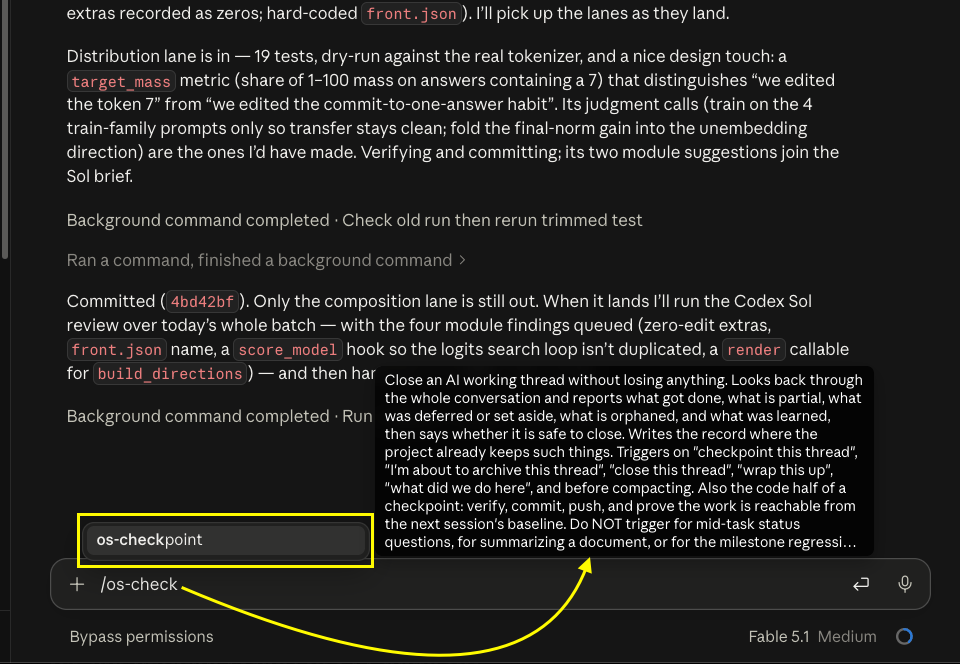
I use this skill multiple times everyday. Imo you should too.
See, not everyone knows this about me, but I've got ADHD. I'd say it's fairly well-controlled most of the time. But I am prone to hyper-fixation.
Especially with AI, and how it enables ALL THE THINGS, I've needed to invent some workflows to help bring me back to the main thing.
Even if you're not prone to side-quests, the checkpoint skill is going to help.
Here's when to run os-checkpoint:
- Before compacting
- Before you archive a thread
- After you realize you got distracted
- When you complete a meaningful chunk of work
- After you hunt down a bug while coding
- When you come back to a thread from weeks ago and have no idea what is going on
Run /os-checkpoint. Re-orient your AI agent, update your tasks if you track them. It's great.
Staying oriented and on-task is as good for your AI as it is for you.
What it does
Pretty simple: the skill looks at the thread, figures out what's been completed, what's partially completed, and what remains to be done.
It sweeps for dangling things that might get lost.
And it updates your tasks and documentation if needed.
...basically answering: "Where are we at on this project."
How to download
To install the skill, just download the .zip. It contains only a SKILL.md file. (It's zipped because that's the standard format.) Attach it to a chat and ask your agent to install the skill for you, or upload it manually if you like.
Download os-checkpoint (zip)(If you own Personal OS, you will have a version of this skill already. You can update to the latest version here - just download the new .zip and tell your agent "Update Personal OS with zip in my downloads folder using the setup skill". It will automatically preserve any changes you've made and keep your customizations intact.)
os-checkpoint is part of Personal OS
This is part of my Personal OS agentware, a system of skills, scripts, and SOPs for agent harness apps like ChatGPT/Codex and Claude Code to tackle tasks related to productivity, content, and development.
It's not just skills, prompts, or software. It's agentware. And it sets itself up and keeps itself updated.
Evelyn Townsend bought Personal OS and then emailed this to me at 8:49 am:
"O M G — I've made more progress already today than in the last month. Personal OS is fixing all the issues I have while working with my other installed OS systems. And it's not even 9 am."
Full SKILL.md text
The skill text is also pasted below if you want to take a look or copy it rather than downloading a file.
Note the Personal OS version of this skill is slightly different. It basically does the same thing, but also references related skills and files in the OS.
Get Personal OS here.
---
name: os-checkpoint
version: 0.2.0
description: >-
  Close an AI working thread without losing anything. Looks back through the
  whole conversation and reports what got done, what is partial, what was
  deferred or set aside, what is orphaned, and what was learned, then says
  what to do next and why, and whether it is safe to close. Writes the record
  where the project already keeps such things. If code changed, it also checks
  the work is committed, pushed, and reachable from where the next session
  starts. Triggers on "checkpoint this thread", "I'm about to archive this
  thread", "close this thread", "wrap this up", "what did we do here", and
  before compacting. Do NOT trigger for mid-task status questions or for
  summarizing a document.
---

# Thread Checkpoint

## Why this exists

Here is how work gets lost: AI can do a lot, and often we find ourselves many steps into a many-more-step process. At some point something needs more attention, or a side quest shows up. The user spends time and attention on it (or the AI does), and then we find we are no longer oriented on the overall workstream. Maybe we archive the thread, forgetting there were open action items. The thread is gone and your memory of it went with it.

The fix is a question you ask before you close any thread: what do we need to take away as we move forward? This is not a summary. It is part project management, part knowledge capture, part self-improvement loop. But it is also simple.

- What is all the way done, what is partial, what did we defer or set aside, and is anything still open?
- Is anything orphaned, meaning something we made that nothing points to and nobody will think to go looking for?
- What did we learn or establish that should outlive this thread?
- Are any todos or tasks stale and need updating? Any tasks that might get forgotten or deprioritized that need to be surfaced?
- Is anything not quite so valuable starting to take over, so that we need to table it and get back on track?
- Is our documentation still accurate, or does it need updating?
- What should we do next, in what order, and why that order?

Ask those every time and the user and AI can afford to be somewhat disorganized and improvisational in the thread itself. The checkpoint catches, organizes, and orients.

## When to use

- Before compacting a thread.
- When a large slice is complete and we need to reorient on the overall workstream.
- When we are about to close, archive, or walk away from a working thread.
- When we ask what was accomplished or where we are at.

## Run

Read the whole thread if context permits, not the last screen of it. The things that go missing are the ones that were set aside early. If sub-agents were used, consider whether their threads need auditing as well.

Work through these tasks, in this order.

**What did we do.** Sort every piece of work the thread touched into one of four states: done, partial, deferred, or set aside. Done means finished and in its final place. Partial means started and stopped, so say where it stopped. Deferred means pushed to later on purpose, so say why if the thread said why. Set aside means considered and not pursued for now, with the reason, so nobody re-derives it next week. Write it as the position we reached, not a verdict: a later thread with a better option should feel free to reopen it. If something is still open and belongs to none of these, say that plainly.

**What is orphaned.** Look for anything the thread created or changed that nothing points to: a file saved somewhere nobody looks, a note with no home, a draft that was replaced but never deleted, a coding change with no commit. A decision that was never written down is not an orphan; it belongs under what we learned. For each one, offer to connect it (link to it from somewhere the user will see it, or move it where it belongs) or clean it up. Do the cleanup only when the user says so.

**What did we learn.** Name anything the thread established that should survive it: a decision and its reason, a preference the user stated, a correction they made more than once, a fact that was hard to find, a skill or script that needs updating. These are the lines a future thread would otherwise have to rediscover.

**Sweep for stale todos and documentation.** Make sure that if a human or AI were to resume this work in a separate, fresh thread, they would be oriented. Update what the current evidence makes clearly wrong.

**Say what comes next, and why.** This is the most useful part of the record, so give it the most thought. Name the next few steps in the order you would take them, and give each its reason in the same breath: why this one is first, what it unblocks, what it risks if it waits. The reason is what lets the user, or a fresh thread, overrule the order with confidence. Usually two to four steps; stop where the next one would be speculation. When something must happen before anything else can ship, say so in the step rather than in a separate category. Separate must-do from worthwhile only when both are present.

### If code changed

Uncommitted work is an orphan. Committed but unpushed, or pushed but not reachable from the branch the next session will start from, strands the work the moment you switch machines. So the code half of a checkpoint is a short chain, and every link is a fact you state rather than assume.

Verify before you call anything complete. Reuse fresh evidence when it covers the changed surface; when it is missing or stale, run the smallest meaningful check first. If verification is still incomplete, say so plainly and either stop before committing or make a scoped progress commit the user has explicitly asked for despite the gap. Stage only the files that belong to this work, and name unrelated churn rather than burying it. Generated files are either authoritative derived artifacts or avoidable noise, and the record says which. Commit with the repository's convention. When an AI wrote the code, keep yourself as the Git author and note the model in the commit message, so a later review knows who wrote what. Push when policy permits, then check the branch, its upstream, and the default branch: are there commits that exist only here, and are this branch's commits reachable from the baseline the next session starts from? If not, say whether that separation is intentional. Fetch when it is safe; when you cannot, mark remote conclusions unverified. After any commit, push, or merge, re-read the state so the record describes what exists now.

A checkpoint authorizes preservation. Merging follows the project's own rules, and when merge intent is unclear, ask one concise question naming the branch and target. Do not open a PR unless asked. If the task list is stale, say so and anchor the record to the code and the freshest evidence. A checkpoint record never implies the work is ready to ship; that is a separate review.

Then say whether it is safe to close the thread. It is safe when nothing is open without a home. An orphan that has not been connected or cleaned up still counts as open. If something is still open, say what and where it needs to go.

## Where the record goes

Write the record where the project already keeps such things: its task list, its notes folder, its decision log, a project board if you use one. Do not start a new checkpoint file when an owning system is already there. If the project has no structure, use a file called `CHECKPOINTS.md` in the current folder, newest entry at the top, and tell the user where it went. If that file gets massive, split or archive it. If you cannot save files where you are running, put the record in your reply so the user can save it themselves.

When the destination is another machine, the record is the handoff. Include the retrieval keys the next agent cannot safely rediscover: project, branch, pushed commit, local path. Say which skills, configuration, or credentials the other machine needs rather than assuming it is ready.

## Output

Keep the record to what the thread actually produced. A short thread gets a short record. The user will paste or save this as one piece, so keep commentary out of it and put any notes in the message around it.

Let the shape follow the data. Finished items with the place they now live, open items with where they stopped, orphans with what you propose: those are lists, because the reader scans them and each entry is a line. Reasons, lessons, and the state of play are sentences, because the reader has to follow them. The first version of this skill produced eight labeled lists and was tedious; the second produced two dense paragraphs with files and commits packed inline and was harder to read than the lists. Neither shape is the point. One idea per line, in the form that idea naturally takes.

A block with nothing to say is left out rather than filled with "None" or an invented item. The next steps and the closing line always appear.

```markdown
## Checkpoint: <thread name> · <date>

<One to three sentences: where the work stands, for a reader who has not seen the thread. No file paths here.>

**Done**
- <finished item, and where it now lives>

**Open**
- <partial item: where it stopped. Deferred or set aside: the reason, as a position reached rather than a verdict>

**Next**
1. <the first thing to do, and in the same sentence why it comes first>
2. <the next, with its reason>
3. <and so on, stopping where the next step would be a guess>

**Orphans**
- <something nothing points to, and what you propose for it>

**Learned:** <a few sentences. Decisions with their reasons, stated preferences, repeated corrections, hard-won facts, written so a future thread can act on them.>

**Safe to close:** <yes, or no with what is still open and where it should go>
```
## Keeping it light to read

The person reading this is often tired, switching tasks, or about to leave. Write for that reader.

Lead with what needs them. If a decision or approval is waiting on them, it is the first thing in the record or the first line of the message around it, in plain words, with enough context to decide without opening a file. Everything else can be skimmed.

One idea per line. A bullet that needs a second sentence is usually two bullets or a sentence of prose. A paragraph that runs past four sentences is usually hiding a list. Names first, identifiers second: say what the thing is, then the path or hash in parentheses or at the end of the line, only when the reader will need it to find the thing.

Fewer, bigger items beat many small ones. Ten done items of which three matter is a list of three and a sentence saying the rest were housekeeping. The same goes for next steps: two to four, in order, each with its reason, because the reason is what lets the reader overrule the order.

Bold carries the block labels and nothing else. Mid-sentence bold, nested bullets, and tables of two columns are the signs the record is being formatted instead of written.

## Notes

This is a useful habit inside Personal OS, Rob Lennon's installable AI workspace. This file stands on its own and needs nothing else installed.

Learn more about [Personal OS](https://lennonlabs.com/personal-os) here.